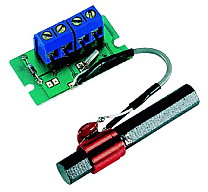
Note: This receiver is no longer available from Conrad!
You can however get similar receivers from other suppliers.
You may need to change the design of the interface though!
There is a little overview here:
DCF77
Receiver Modules
The Reicheld receiver module:
DCF
77 receiver module. This module requires a different circuit!
Schematic diagrams (PDF);
Temic T4224 datasheet (PDF) (223 kB)
Start up Google earth. Type: '50° 0′ 56″ N, 9° 0′ 39″ E' <Enter>.
You should now be able to see the
'DCF77' transmission towers.
Now zoom out until you have the position of your receiver on the edge of your
screen. Draw a imaginary line on your screen from DCF77 to your receiver.
The ferrite rod should be in a horizontal plane and perpendicular to this line.
Alignment isn't critical. It works ± 45°. The rod doesn't receive anything from the side, so it's best to point it to a probable interference source;
                           Transmitter


                               ===
Interference          ===============  Rod
source                         ===
| Pin | Signal |
|---|---|
| 1 | GND |
| 2 | Power |
| 3 | + Data |
| 4 | - Data |
The receiver runs on 1.2 ... 15 Volt and consumes ca 3 mA.
3 and 4 are open collector outputs (max 30 V, 1 mA) with opposite polarity;
Pin 3:

    ┌─┐       ┌─┐    open
    │ │       │ │
 ───┘ └───────┘ └─── closed (GND)

Pin 4:

 ───┐ ┌───────┐ ┌─── open
    │ │       │ │
    └─┘       └─┘    closed (GND)

   >   < 0.1 or 0.2 seconds

    <────────> 1 or 2 seconds
One way of using this receiver, is to power it from a USB port;
 2 Ø--*--< + 5 V from USB (Red)
      |
      |
     +++
     | | 6k8
     | |
     +++
      |
      |
 3 Ø--*--> To RXD of RS232 port

 1 Ø--*--> To GND of RS232 port
      |
      +--< GND of USB (Black)

      +--- RS232 Shield
      |
      +--- USB Shield
It's probably a good idea to filter the power a bit (not tested);
           220 Ω
         +-----+
 2 Ø--*--+     +--*--< + 5 V from USB (Red)
      |  +-----+  |
      |           |
      |+         +++
    --+-- 10 µF  | | 6k8
    --+-- 16 V   | |
      |-  Tant.  +++
      |           |
      |           |
 3 Ø--------------*--> To RXD of RS232 port
      |
 1 Ø--*--------------> To GND of RS232 port
      |
      +--------------< GND of USB (Black)

                  +--- RS232 Shield
                  |
                  +--- USB Shield
You could add a LED (not tested);
           220 Ω
         +-----+
 2 Ø--*--+     +--*-------*-----< + 5 V from USB (Red)
      |  +-----+  |       |
      |           |       |
      |+         +++      |
    --+-- 10 µF  | | 6k8  |
    --+-- 16 V   | |      |
      |-  Tant.  +++      |
      |           |   |  /  c
      |           | b |/
      |           *---|    BC548B
      |           |   |\
      |           |   |  \| e
      |           |      -|
      |           |      +++
      |           |      | | 1 kΩ
      |           |      | |
      |           |      +++
      |           |       |
      |           |       |
      |           |     --+--
      |           |      \|/  --> LED
      |           |     --+--
      |           |       |
      |           |       |
 3 Ø--------------*-------------> To RXD of RS232 port
      |                   |
 1 Ø--*-------------------*-----> To GND of RS232 port
                          |
                          +-----< GND of USB (Black)

                          +------ RS232 Shield
                          |
                          +------ USB Shield
Any low power low frequent general purpose NPN transistor can be used instead of the BC548B.
| Transistor | Vce max |
|---|---|
| BC 546 | 80 V |
| BC 547 | 50 V |
| BC 548 | 30 V |
| Suffix | hfe |
|---|---|
| A | 250 |
| B | 300 |
| C | 500 |
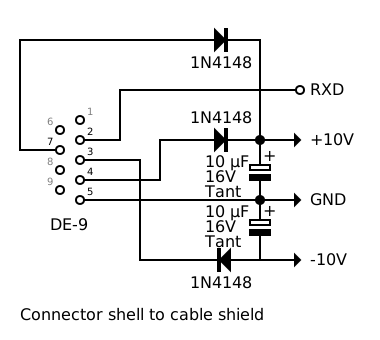
The current is just a few mA, so the receiver can also be powered from the
serial port. The setup below is designed for a long cable. DTR and RTS
provide the positive supply voltage, TXD the negative.
The following pins are used;
| Pins | Signal | Use | |
|---|---|---|---|
| 9 | 25 | ||
| 4 | 20 | DTR | + |
| 7 | 4 | RTS | + |
| 5 | 7 | GND | GND |
| 3 | 2 | TXD | - |
| 2 | 3 | RXD | RXD |
The circuit for a 9-pin connector:
And the circuit for a 25-pin connector:
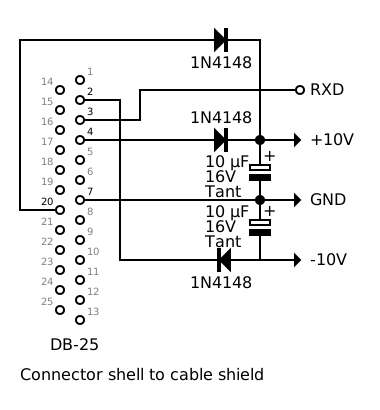
The rectifier circuit fits in a 25 pin RS232 plug.
Note that the actual voltage is less with a load applied!
A 4 wire shielded cable runs between this power supply and the level converter
below;
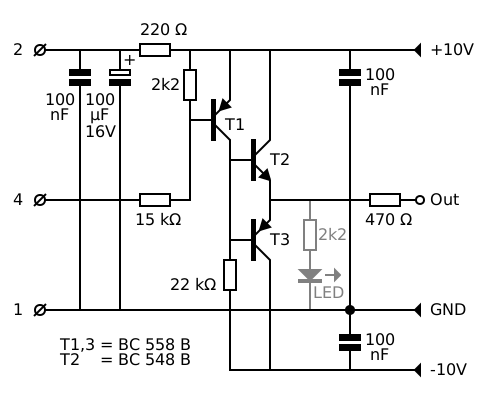
This circuit consumes ca 1.5 mA (plus the current supplied to the receiver).
It drives ca 6 V into a RS232 tester.
The LED is optional (not tested!).
BC558B is the PNP complement of the BC548B;
| Transistor | Vce max |
|---|---|
| BC 556 | 80 V |
| BC 557 | 50 V |
| BC 558 | 30 V |
Possible sources of interference;
| Frequency | Harmonic |
|---|---|
| 38.75 kHz | 2 |
| 25.833 kHz | 3 |
| 19.375 kHz | 4 |
| 15.5 kHz | 5 |
TV has a horizontal deflection frequency of 15.625 (EU) or 15.750 (US) kHz. The 5th harmonic is 78.125 (EU) or 78.750 (US) kHz, which is close to the DCF's 77.5 kHz. Other possible sources are CRT computer displays.
The entry for a refclock in ntp.conf is;
server 127.127.Type.Unit_Number
In this case you need the Generic Reference Driver mode 5
Add the following to ntp.conf;
# Conrad DCF77
server 127.127.8.0 mode 5
fudge 127.127.8.0 time1 0.220 refid DCF77a
You may need to change the time1 value.
The GENERIC driver wants a symlink in /dev/ telling it which is the source of the time. EG ttyS2;
refclock-0 -> ttyS2
created a file '77-local.rules' in '/etc/udev/rules.d/' for this purpose. It contains the following line;
KERNEL=="ttyS2" SYMLINK+="refclock-0"
Replace 'ttyS2' with the tty you use.
I had trouble using this with a
multi serial card.
Running it on a standard RS232 port works fine.
This may have something to do with fact that 200 ms pulses cause framing errors;
Normal data; One startbit (0), 8 databits (0 or 1), one stopbit (1);
   ─────┐   ┌───┬───┬───┬───┬───┬───┬───┬───┬─────────
        │ S │ 0 │ 1 │ 2 │ 3 │ 4 │ 5 │ 6 │ 7 │ S
        └───┴───┴───┴───┴───┴───┴───┴───┴───┘
          .                                   .
         /|\                                 /|\
          |                                   |
          Check; Is bit 0?                    Check; Is bit 1?
          If not; Framing error               If not; Framing error
Data from DCF reciever;
A '0' is coded as a 100 ms pulse (the ports reads 240 / 0xF0);
   ─────┐                   ┌─────────────────────────
        │      100 ms       │
        └───────────────────┘
A '1' is coded as a 200 ms pulse (the port reads 0);
   ─────┐                                       ┌─────
        │                 200 ms                │
        └───────────────────────────────────────┘
                                              .
                                             /|\
                                              |
                                              Framing error
If this is the case limiting the pulse length to 180 ms (or slightly less) will solve the problem; The port still reads 0, but without framing errors;
| Length ms | Zero bits | Hex Value |
Length ms | Zero bits | Hex Value |
|---|---|---|---|---|---|
| 20 | Start | FF | 120 | 4 | E0 |
| 40 | 0 | FE | 140 | 5 | C0 |
| 60 | 1 | FC | 160 | 6 | 80 |
| 80 | 2 | F8 | 180 | 7 | 00 |
| 100 | 3 | F0 | 200 | (Par) | 00 |
NTPD decodes 'ones' shorter than 180 ms correctly, but get confused when 'zeros' are encoded as pulses of 120 ms or more!
Currently NTPD uses parity, resulting in parity errors instead;
   ─────┐   ┌───┬───┬───┬───┬───┬───┬───┬───┬───┬─────────
        │ S │ 0 │ 1 │ 2 │ 3 │ 4 │ 5 │ 6 │ 7 │ P │ S
        └───┴───┴───┴───┴───┴───┴───┴───┴───┴───┘

   ─────┐                   ┌─────────────────────────────
        │      100 ms       │
        └───────────────────┘

   ─────┐                                       ┌─────────
        │                 200 ms                │
        └───────────────────────────────────────┘
I added low latency to the setserial config;
/dev/ttyS0 uart 16550A port 0x03f8 irq 4 baud_base 115200 spd_normal skip_test low_latency
/dev/ttyS1 uart 16550A port 0x02f8 irq 3 baud_base 115200 spd_normal skip_test low_latency
My current setup doesn't work with the most recent kernel. This is caused by a change in /usr/src/linux/drivers/tty/serial/8250/8250_port.c, which is supposed to fix CVE-2026-97481, but leads to new problems;
	/*
	 * Recover from no-data-ready and FIFO error condition to avoid getting
	 * stuck in the ISR.
	*/
	if (!(status & UART_LSR_DR) && (status & UART_LSR_FIFOE))
		serial8250_clear_and_reinit_fifos(up);
Removing this bit and recompiling the kernel solves the problem.
Alternatively one could make the following modification
(shown in green):
	if (!(status & UART_LSR_DR) && (status & UART_LSR_FIFOE) && \
	    !(status & UART_LSR_PE))
		serial8250_clear_and_reinit_fifos(up);
This makes it ignore parity errors, which doesn't resolve the issue
completely but does reduce the problem considerably!
Below the diff as a patch;
--- 8250_port.c.orig	2026-10-15 14:15:52.000000000 +0200
+++ 8250_port.c	2026-11-11 09:00:35.850614579 +0100
@@ -1937,7 +1937,8 @@
 	 * Recover from no-data-ready and FIFO error condition to avoid getting
 	 * stuck in the ISR.
 	 */
-	if (!(status & UART_LSR_DR) && (status & UART_LSR_FIFOE))
+	if (!(status & UART_LSR_DR) && (status & UART_LSR_FIFOE) && \
+	    !(status & UART_LSR_PE))
 		serial8250_clear_and_reinit_fifos(up);

 	/*
A Debian 12 / Bookworm kernel with this patch here.